

Sales Order Management ERP – Best-Practice Sales Order Processing Solution
The order management in an ERP system in one of the key functions that initialize the work flow. One may view it as the fuel that proceeds the process. Thus it is a critical point in the process. The information that will be input into the order will affect the whole process.
Intuitively the sales order processing will be available in an ERP system. Therefore the process should be able to receive, enter and track sales orders. The output should encompass, post rout and handle exceptions. Another critical feature is the reporting.
Creating a Sales Order directly from a Quote
In 99% of the cases an ERP system includes quote management and the conversion of an offer to an order.
Most ERP Systems offer this feature because it follows the natural work flow of the supply chain management; you send the customer an offer, he accepts it and then with one click you should be able to say to the system – please generate me an order out of this quote. The details of the customer, the products, prices and other details like delivery condition etc are already entered and you reuse them on the order. Take a look at the next resource.
ERP – Creating the Demand – Automation of Order Details into your ERP System
 The sales order in the ERP system generates the demand, reserves inventory, generates planned purchase orders and work orders to procure raw materials and build manufactured parts. An effective ERP system offers possibilities for the user the capture the data very easily and process oriented.
For example, when entering an order for certain customer the system should initiate automatically the customer details and suggest only its relevant products.
According to the land of origin of the customer the system should enter to the order customs data automatically. Such automation of data enter makes it easier for the user and eliminates the probability of mistakes.
Check Availability of Stocks and secure Deliveries
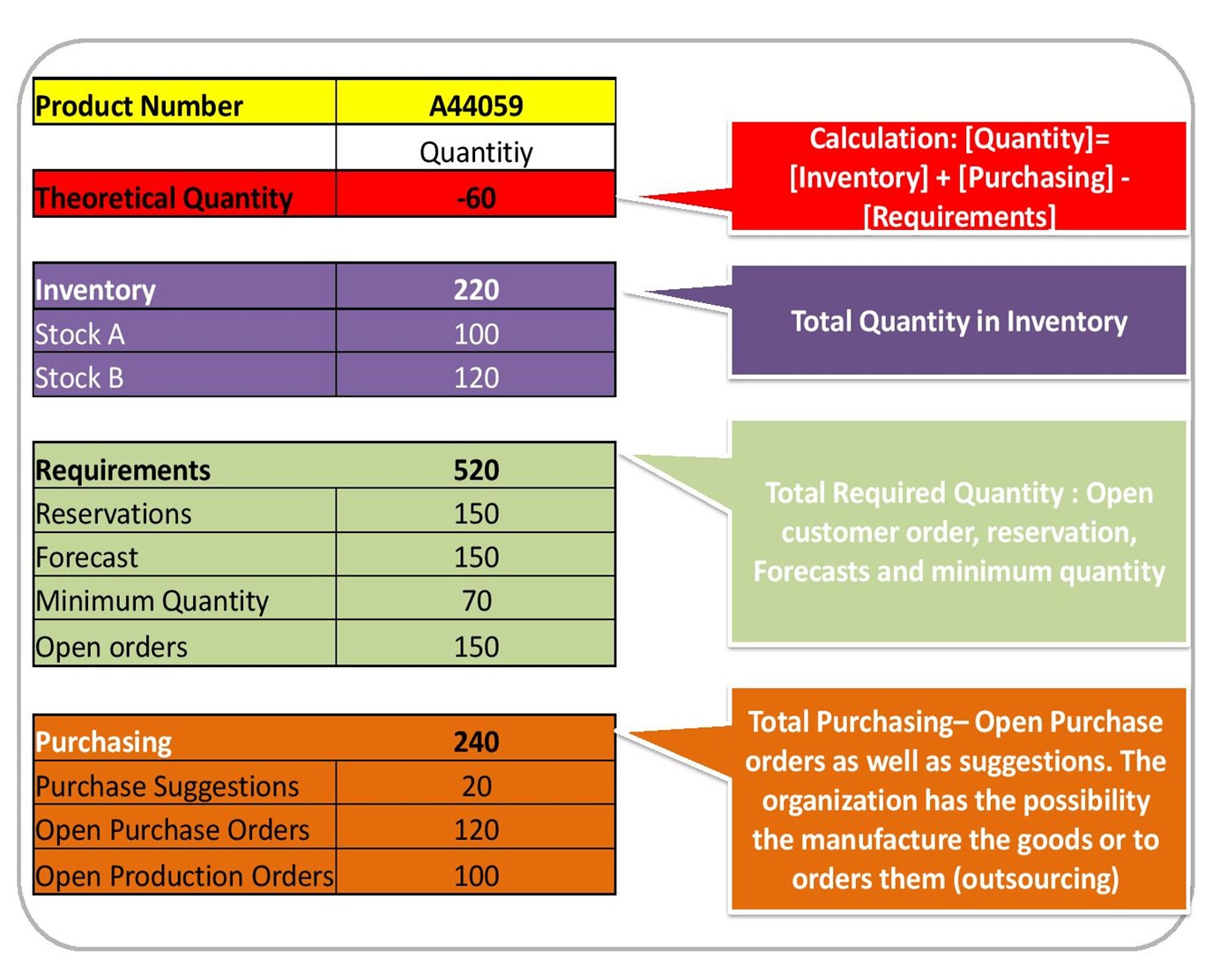 An effective ERP system shall allow the user to check in real time the availability of products via a report that shows whether the items are in stock or will be produced in the near future.
This view, when right configurated, will show also whether products will be delivered through open purchase orders or open manufacturing orders or purchase orders or open work orders associated with the order (through MRP 2).
This is a very helpful tool for sales back office. Try to imagine the sales person sits in his office bombed with telephone calls from customers all over the world demanding to know the status of their orders. With a few clicks (literally) he or she can deliver the exact status and due dates of the order. It builds the confidence of the back office – they feel they can provide answers at any time. The Report may seem like that (please view the diagram).
Create and maintain Blanket Orders
Blanket orders are an important process in the work flow when you have a long term relationship with your customer and you would like to ensure him an appropriate delivery of goods. With blanket orders you may plan the demand for the long term and ensure a certain level of prices.
The system should be able to perform the generation of an order out of a blanket order (Abrufbestellung). An each time an order is initiated the system should update the blanket order. In this way you will know the exact status of the blanket order.
Pricing Policy
Introducing pricing policy during the capture of an order he is powerful tool. Again this is a bit CRM but will be carried out when entering an order; Pricing policy is managing different price codes for different cases, different discounts or surcharges that automatically initiated, entered or at least suggested to the user and he or she may decide whether to capture or not.
In this way the management of sales may supervise sales team or enforce its policy automatically.
Status Management
The status management of an order is important in order to monitor sub processes in the supply chain management – approval of orders or submission to the MRP 2 process. In some cases the customer would like to approve the order before it is submitted for carry out or deliver.
The world of supply chain management is full of thousand cases where orders were submitted for process while the customer had not given his consent yet.
Address Management
The terms bill to party, sold to party or ship to party are reality for a long time now. The global village dictates us new rules. The customer ordered but you are delivering to his customer and the bill goes to the headquarters. And each of these speaks other language.
I did not yet mentioned the different post format required by various lands. Here we are sliding to CRM but still an effective order management system should be able to support you in such case.
And when it does it automatically you will be a happy man or woman because than you know that mistakes will be eliminated. Learn more about the subject with the next information.
Comments are closed.